
In-Person Digital E-Forms
& E-Signature System
This solution is purpose-built for healthcare providers and NGOs to streamline case registration, informed-consent signing and service application workflows. With a highly secure paperless process, organisations can improve operational efficiency while protecting medical privacy and sensitive case data under strict compliance requirements.
- Millisecond-level SignalR instant push to iPad devices
- Apple Pencil / finger signing directly on screen
- Encrypted database storage with tamper-resistant PDF generation
- Supports validation checks and secure data return to the back-office system
How It Works
From back-office case selection and auto-filled data tags, to instant iPad delivery, on-screen signing, encrypted storage and tamper-resistant PDF generation, the workflow is designed to be secure, fast and paperless from end to end.
-
Smart Template Population
Standard medical and social-service templates are prebuilt into the system. When staff select a case, tags such as client name, ID number, medical record number or case number are automatically inserted into the e-form, eliminating repetitive typing and reducing human error.
-
SignalR Instant Push
Using real-time SignalR communication, staff can push the prepared e-form to the on-site iPad in milliseconds with a single click. The client immediately sees the live form without waiting for page reloads.
-
Secure iPad Signing
Clients or patients can review the content directly on the iPad and sign naturally with Apple Pencil or a finger. The experience feels close to pen-and-paper while retaining legal traceability and audit-friendly records.
-
Secure Storage & Auto-PDF
Once signing is completed, the form is returned to the back-office system immediately. Signature strokes and change records are written into an encrypted database, while the system automatically generates a tamper-resistant PDF for audit, retrieval or email backup.
System Architecture Overview
The diagram below shows the flow of data between the back-office management system, the server, the on-site iPad client, the database and the PDF archive layer.
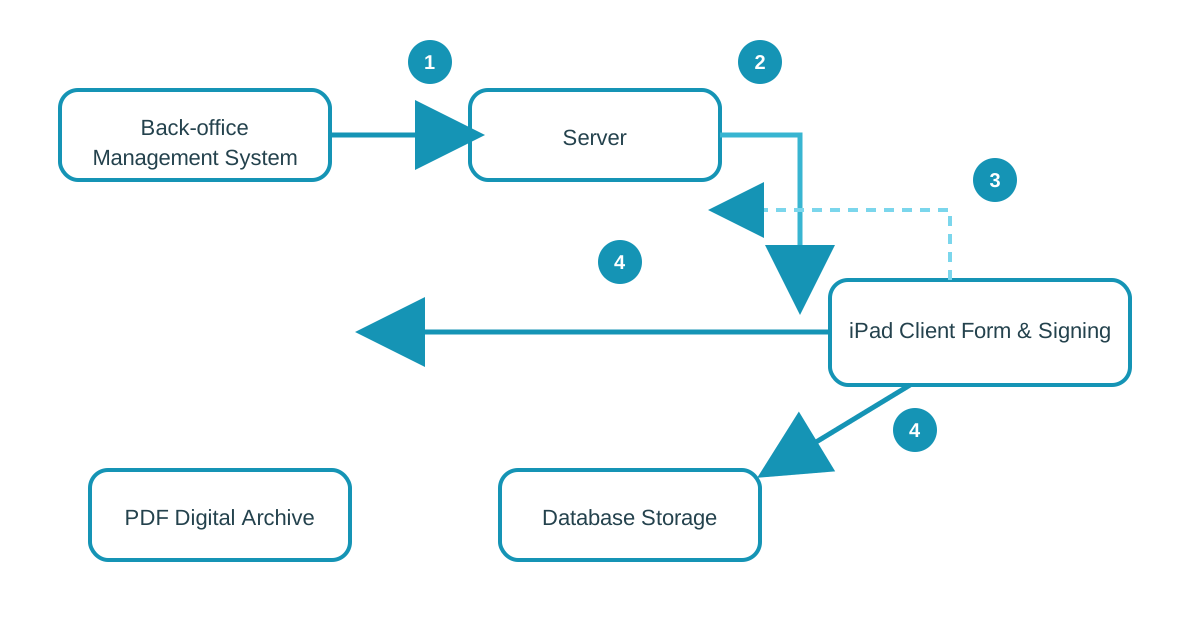
1. Data Fetch & Tagging
Once staff select a case, the system retrieves the patient/client name, record number and tagged fields from the database to populate the e-form automatically.
2. Instant Push to iPad
The server keeps a SignalR connection with the iPad so the prepared form can be pushed to the device immediately without page refresh.
3. Review & Sign
The client reviews the content, completes required fields, and signs directly on screen while the system captures signature evidence and timestamps.
4. Save & Archive
After submission, the workflow writes structured data and signature records into the database and also generates a tamper-resistant PDF archive.
Simulated iPad E-Form Demo
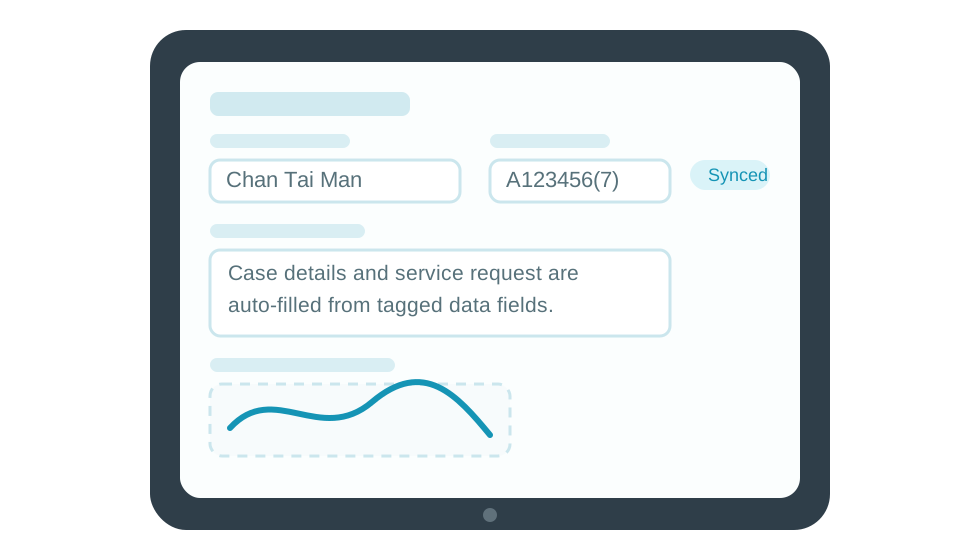
The illustration below shows a sample iPad form interface tailored to healthcare and NGO scenarios. It demonstrates auto-filled case data, required-field validation and an on-screen signature area for website demo use.
Key Benefits
Designed for high-sensitivity healthcare and NGO use cases, the solution delivers stronger privacy protection, smoother real-time interactions, fewer admin mistakes and a more accessible front-line service experience.
-
Real-Time & Fluid User Experience
With SignalR-based synchronisation, the back-office and iPad client stay in sync in real time. This removes the lag and friction of traditional browser refresh workflows during live service delivery.
-
Privacy & Security Compliance
Built for HIPAA-style privacy requirements, PDPO compliance and other sensitive-data scenarios, the system uses strong encryption in both transit and storage to reduce leakage and unauthorised access risks.
-
Zero Paper, Zero Error
Auto-filled tags plus required-field validation reduce repeat data entry, missing signatures and incomplete forms. Everything is archived digitally, cutting paper handling and manual rework.
-
Accessible & User-Friendly
iPads can enlarge text and touch targets for elderly patients, visually impaired users and front-line NGO service recipients, helping improve usability and completion rates on site.
Practical Enhancements for Real-World Use
Validation & Mistake Prevention
The system performs required-field checks before submission. If a signature or key field is missing, the iPad immediately prompts the user and blocks submission, eliminating the common paper-based problem of missing signatures.
FAQ
Q: If the iPad is lost, will client data leak?
A: No. SignalR is used mainly for real-time transmission. Once the form is signed and submitted, the iPad screen can be cleared immediately. No plain-text private data needs to remain on the device, and encrypted local caching plus access control further reduce risk.
Q: Can the system prevent missing signatures or incomplete fields?
A: Yes. The workflow checks required fields, signatures and critical data before allowing submission, reducing after-the-fact correction work and improving process quality at the source.
Q: How are completed forms stored and retrieved later?
A: Structured data is written into the SQL database, while an encrypted PDF is automatically generated for search, audit, printing or email distribution to the relevant client or staff members.
Make front-line signing faster, safer and more professional
If you need a more reliable digital workflow for healthcare consent forms, NGO service applications, on-site registration or any sensitive signing process, talk to us. We can tailor the form flow, device experience and data security controls to your operational needs.
Contact Us